


 Child Safety & CSAM Prevention Policy



-
On today's Cyber and Cloud Security issue, if you are in the category of those who use their DOB as a password, stop it.
Passwords such as admin123, 1111, 123456, your first or last name, etc., are vulnerable. You risk a lot. Such a password is easily cracked by hackers.
Follow this password policy: your password has to be a combination of alphanumeric, special symbol or character, Capital letter, not less than 8 character long. Do not use one password forever. It recommended you change it every 3 months.
Go to https://password.kaspersky.com/ and test your password and see how strong it is.
#CloudSecurity #CyberSecurity
On today's Cyber and Cloud Security issue, if you are in the category of those who use their DOB as a password, stop it. Passwords such as admin123, 1111, 123456, your first or last name, etc., are vulnerable. You risk a lot. Such a password is easily cracked by hackers. Follow this password policy: your password has to be a combination of alphanumeric, special symbol or character, Capital letter, not less than 8 character long. Do not use one password forever. It recommended you change it every 3 months. Go to https://password.kaspersky.com/ and test your password and see how strong it is. #CloudSecurity #CyberSecurity · 0 Commenti ·0 condivisioni ·746 Views ·0 Anteprima
 5
5
-
If you are using Starlink Router, make sure your dish really has a clear sky view. Obstructions could be trees, buildings, masts, poles, etc. Those obstructions can slowdown your internet.
#HappyWeekend
Angela GeorgeIf you are using Starlink Router, make sure your dish really has a clear sky view. Obstructions could be trees, buildings, masts, poles, etc. Those obstructions can slowdown your internet. #HappyWeekend😍 [Angiesmile1]· 0 Commenti ·0 condivisioni ·489 Views ·32 Plays ·0 Anteprima4
-
Weekend Tip
When your internet is unstable, try to ping google DNS and check the latency. This might give you an idea if the issue is from your ISP or not. The lower the latency (time in millisecond) the better the link. Latency is best at single or double digit.
How to ping google DNS
1. Windows + R
2. Type cmd and Run (Enter)
3. Type ping 8.8.8.8 -t (for a continuous ping)
4. Look at the column showing something like time=72ms. That is your latency. If it is from 100ms and above, your internet may be slow.Weekend Tip😀 When your internet is unstable, try to ping google DNS and check the latency. This might give you an idea if the issue is from your ISP or not. The lower the latency (time in millisecond) the better the link. Latency is best at single or double digit. How to ping google DNS 1. Windows + R 2. Type cmd and Run (Enter) 3. Type ping 8.8.8.8 -t (for a continuous ping) 4. Look at the column showing something like time=72ms. That is your latency. If it is from 100ms and above, your internet may be slow.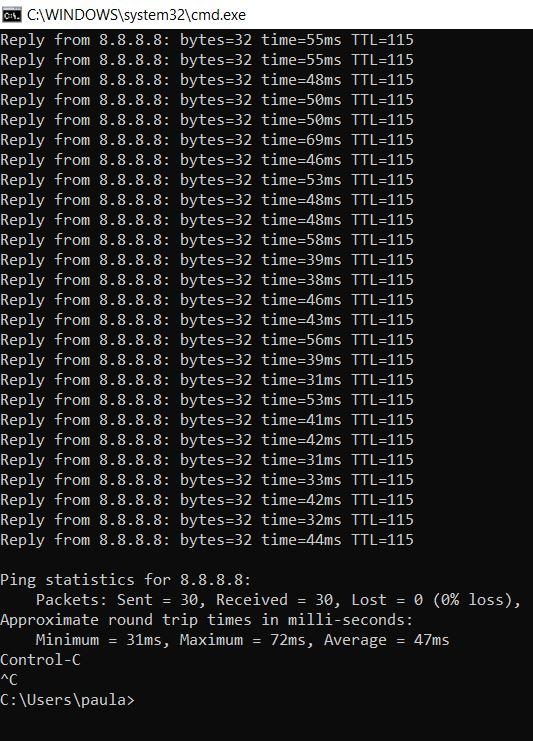 · 0 Commenti ·0 condivisioni ·571 Views ·0 Anteprima4
-
Simple Hacks for you today
To see the Host name, IP and Mac ID of network adapters in your windows system...follow this steps:
1. Press WINDOW KEY + R
2. Type cmd and press enter (opens command prompt)
3. Type ipconfig/all and press enter
If you don't want to be saving passwords on your browser it's advisable to go private.
On your Chrome browser
Ctrl + Shift + N
Opens new incognito window in web browser
On your Firefox browser
Ctrl + Shift + P
Opens new incognito window in web browser
On your Brave browser
Ctrl + Shift + N
Opens new incognito window in web browser
Alt + Shift + N
Opens new incognito window in web browser with TorSimple Hacks for you today To see the Host name, IP and Mac ID of network adapters in your windows system...follow this steps: 1. Press WINDOW KEY + R 2. Type cmd and press enter (opens command prompt) 3. Type ipconfig/all and press enter If you don't want to be saving passwords on your browser it's advisable to go private. On your Chrome browser Ctrl + Shift + N Opens new incognito window in web browser On your Firefox browser Ctrl + Shift + P Opens new incognito window in web browser On your Brave browser Ctrl + Shift + N Opens new incognito window in web browser Alt + Shift + N Opens new incognito window in web browser with Tor· 2 Commenti ·0 condivisioni ·350 Views ·0 Anteprima
 4
4

Altre storie