

 Child Safety & CSAM Prevention Policy
Weekend Tip
When your internet is unstable, try to ping google DNS and check the latency. This might give you an idea if the issue is from your ISP or not. The lower the latency (time in millisecond) the better the link. Latency is best at single or double digit.
How to ping google DNS
1. Windows + R
2. Type cmd and Run (Enter)
3. Type ping 8.8.8.8 -t (for a continuous ping)
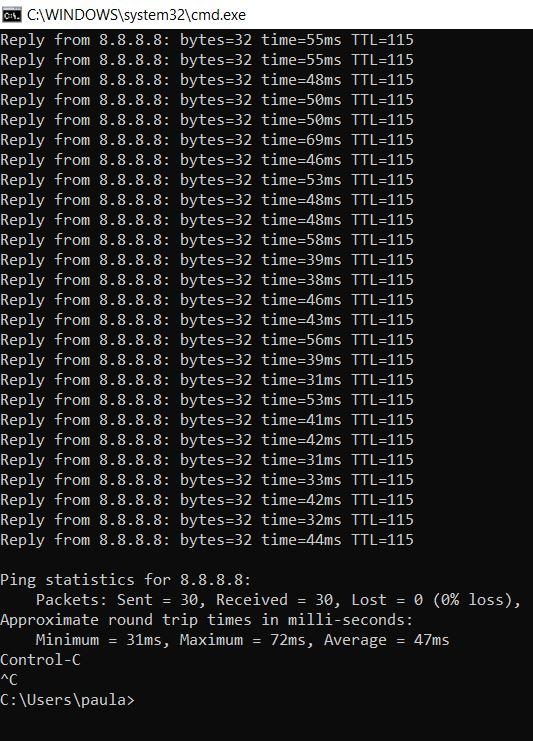
4. Look at the column showing something like time=72ms. That is your latency. If it is from 100ms and above, your internet may be slow.
When your internet is unstable, try to ping google DNS and check the latency. This might give you an idea if the issue is from your ISP or not. The lower the latency (time in millisecond) the better the link. Latency is best at single or double digit.
How to ping google DNS
1. Windows + R
2. Type cmd and Run (Enter)
3. Type ping 8.8.8.8 -t (for a continuous ping)
4. Look at the column showing something like time=72ms. That is your latency. If it is from 100ms and above, your internet may be slow.
Weekend Tip😀
When your internet is unstable, try to ping google DNS and check the latency. This might give you an idea if the issue is from your ISP or not. The lower the latency (time in millisecond) the better the link. Latency is best at single or double digit.
How to ping google DNS
1. Windows + R
2. Type cmd and Run (Enter)
3. Type ping 8.8.8.8 -t (for a continuous ping)
4. Look at the column showing something like time=72ms. That is your latency. If it is from 100ms and above, your internet may be slow.